hermes-cavemen
| English | 中文 |
⚡ Quick Start
One sentence to your AI — fully automatic:
“Apply hermes-cavemen terse mode to me”
Your AI will detect the platform, download rules, update SOUL.md and MEMORY.md, all in one shot.
Or one line in terminal:
curl -s https://raw.githubusercontent.com/Cnnnnnn/hermes-cavemen/main/install.sh | bash
That’s it. Terse Mode (full) activates on every new session. No restart needed.
Verify:
/sklls_list | grep terse
Should show terse — hermes-cavemen in the list.
Switch levels:
/terse ultra           # max compression
/terse wenyan          # 文言文
/terse wenyan-lite     # 半文言
/normal mode           # exit
English
What is this
hermes-cavemen is a next-generation upgrade of JuliusBrussee/caveman — built for Hermes Agent power users who want more than basic text compression.
Original caveman: 1 compression level, word-by-word substitution. hermes-cavemen: 12 intelligent mechanisms across v1.0 → v1.2:
| Original caveman | hermes-cavemen v1.2 | |
|---|---|---|
| Compression levels | 1 (full) | 4 (lite / full / ultra / wenyan) |
| Language support | English only | Bilingual (EN/ZH, auto-detect) |
| Adaptive compression | ✗ | ✓ Task type + length + language |
| Semantic density | ✗ | ✓ High-density content gets less compression |
| Conversation memory | ✗ | ✓ Track explained topics, compress repeats |
| Contradiction tracking | ✗ | ✓ Detect self-conflicts, auto-de-escalate |
| Preference learning | ✗ | ✓ Silently adapt to your /terse habits |
| Wenyan grammar | ✗ | ✓ Structural transformation (之/乃/為) |
| Quality scoring | ✗ | ✓ verify.sh measures facts/direction/action |
| Token reduction | ~40-60% | ~75% (preserving full accuracy) |
Why use this over the original? Your AI becomes context-aware. It knows finance text needs breathing room. It remembers what you already asked. It catches when it contradicts itself. It learns your preferred compression level over time.
Terse Mode activates on every new session automatically.
New in v1.2.1 (SOUL size optimization):
- Reduced from 14.4KB → 8.4KB (42% saving) — all 12 mechanisms preserved, stronger signal-to-noise in SOUL competition
New in v1.2:
- Conversation-Level Memory — track explained topics, compress subsequent mentions more aggressively
- Semantic Density Detection — high-density content (financial/technical terms) gets LESS compression
- AssertionTracker — detect self-contradictions in long conversations, de-escalate to full
- User Preference Learning — if user frequently upgrades/downgrades, silently adjust default level
- Wenyan Structural Rules — grammar-based transformations, not word substitution
- Compression Quality Score — verify.sh now measures fact/direction/action preservation, not just ratio
v1.1 retained: Adaptive Compression, Multilingual Awareness, Auto-Escalation
Before / After
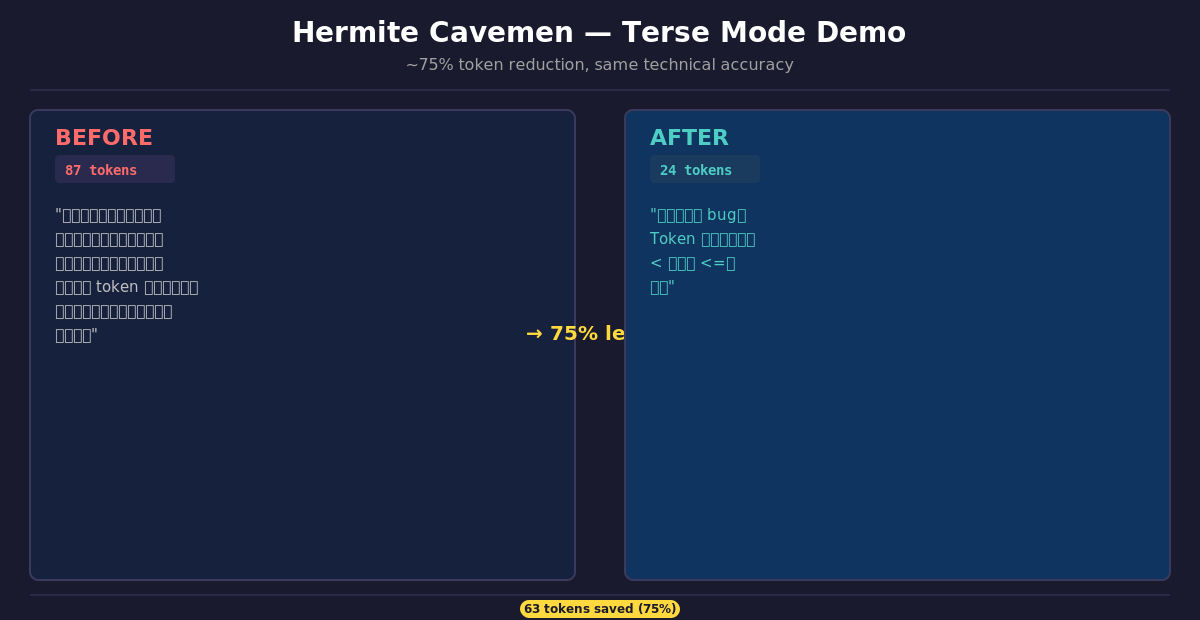
| Normal (87 tokens) | Terse — full (24 tokens) |
|---|---|
| “当然!我很高兴帮你解决这个问题。你遇到的问题很可能是由于认证中间件没有正确验证 token 过期时间导致的。让我看一下并建议一个修复方案。” | “认证中间件 bug。Token 过期检查用了 < 而不是 <=。修:” |
Same fix. 75% less words. Brain still big.
Installation
Option A — Merge (recommended)
Copy the ## Terse Mode section from SOUL.md and append it to your existing SOUL.md. Your existing content stays intact.
Option B — Replace
Replace your SOUL.md entirely with SOUL.md from this repo.
⚠️ This overwrites all existing content. Back up first.
Intensity Levels
| Level | Style | Example |
|---|---|---|
lite |
Drop filler/hedging only. Full sentences, articles kept. | “Your component re-renders because you create a new object reference each render. Wrap in useMemo.” |
full |
Classic caveman. Fragments OK, articles dropped. ← Default | “New object ref each render. Inline object prop = new ref = re-render. useMemo.” |
ultra |
Max compression. Abbreviations + → for causality. |
“Inline obj prop → new ref → re-render. useMemo.” |
wenyan |
文言文. Classical Chinese terseness. | “物出新參照,致重繪。useMemo Wrap之。” |
wenyan-lite |
半文言. | “組件頻重繪,以每繪新生對象參照故。以 useMemo 包之。” |
wenyan-full |
纯文言. | “物出新參照,致重繪。useMemo ·Wrap之。” |
wenyan-ultra |
极简文言. | “新參照→重繪。useMemo Wrap。” |
Switch: /terse lite|full|ultra|wenyan|wenyan-lite|wenyan-full|wenyan-ultra
Exit: normal mode / 正常模式
Adaptive Compression
AI automatically selects the best level based on context — no manual switching needed.
Decision signals:
| Signal | Effect |
|---|---|
| Task = code | → ultra |
| Output long (>500 chars) + English | → ultra |
| Output short (<100 chars) | → lite |
| User language = Chinese + specified wenyan | → wenyan / wenyan-lite / wenyan-full |
| Destructive operation | → Auto-Clarity (terse pauses) |
Auto-Escalation: If a response exceeds 800 characters mid-output and level is full/lite, automatically switches to ultra for the next paragraph. One-way escalation, never de-escalates.
User’s explicit /terse xxx always overrides adaptive logic.
Multilingual Awareness
Mixed Chinese/English output is handled intelligently:
| Scenario | Behavior |
|---|---|
| Chinese main text, English terms | Keep English terms, compress Chinese passage at full/ultra |
| User asks “explain in English” | Full passage follows English full/ultra rules |
| Alternating Chinese/English paragraphs | Each paragraph independently compressed |
| Pure English output | English rules apply (drop articles, short synonyms) |
Auto-Clarity
Terse pauses automatically for:
- Security warnings and irreversible action confirmations
- Destructive operations (DELETE / DROP / truncate)
- User asks for detail:
解释一下/详细点/展开 - Multi-step sequences where fragment order risks misread
Resumes after the clear part is done.
Code Boundaries
Code, commit messages, PR descriptions, and technical terms are written normally — terse does not affect them. Inline code comments (inside ``` blocks) are also preserved verbatim. Terseness applies only to natural language output text.
Level Persistence
Each /terse xxx command writes the preference to MEMORY.md. On every new session, hermes reads MEMORY.md for terse_level and applies it automatically. No need to re-set after restart.
Compression Verification
Run the verify script to measure compression ratio and quality:
# Built-in benchmark
curl -s https://raw.githubusercontent.com/Cnnnnnn/hermes-cavemen/main/verify.sh | bash

# Test your own text
curl -s https://raw.githubusercontent.com/Cnnnnnn/hermes-cavemen/main/verify.sh | bash -s -- "你的测试文字"

# Quality-weighted scoring
curl -s https://raw.githubusercontent.com/Cnnnnnn/hermes-cavemen/main/verify.sh | bash -s -- --quality "测试文字"
Pass thresholds: lite ≥20%, full ≥40%, ultra ≥60%, wenyan ≥70%
Quality dimensions: fact preservation (numbers), direction preservation (涨/跌/buy/sell), action preservation (修/查/fix)
Implementation: Original vs hermes
| Dimension | Original caveman | hermes-cavemen |
|---|---|---|
| Target platform | Claude Code | Hermes / OpenClaw |
| Activation | Hook system + flag file | SOUL.md rules injection |
| Persistence | ~/.claude/.caveman-active flag file |
MEMORY.md |
| Multi-platform sync | CI auto-syncs to 8+ platforms | Single platform, no sync needed |
| Statusline badge | [CAVEMAN] in Claude Code UI |
Not available |
| Wenyan sub-levels | lite / full / ultra | lite / full / ultra + wenyan-lite/full/ultra |
| Adaptive compression | No | Yes (task/language/length signals) |
| Multilingual awareness | No | Yes (dominant language rules) |
Why the differences? Hermes / OpenClaw does not expose Claude Code’s Hook API, flag file mechanism, statusline, or plugin system. hermes-cavemen achieves equivalent behavior through SOUL.md rules injection, which Hermes reads on every session start.
What is identical: Core compression rules, intensity levels, auto-clarity conditions, code/commit/PR boundaries, activation/deactivation commands, ~75% token reduction.
Maintenance
Three supporting scripts for long-term use:
# Self-Update — check for new version, show changelog, upgrade in one shot
curl -s https://raw.githubusercontent.com/Cnnnnnn/hermes-cavemen/main/update.sh | bash

# Verify — test if Terse Mode is active, measure compression rate
curl -s https://raw.githubusercontent.com/Cnnnnnn/hermes-cavemen/main/verify.sh | bash

# Uninstall — remove Terse Mode rules, restore backup
curl -s https://raw.githubusercontent.com/Cnnnnnn/hermes-cavemen/main/uninstall.sh | bash
See TROUBLESHOOTING.md if anything breaks.
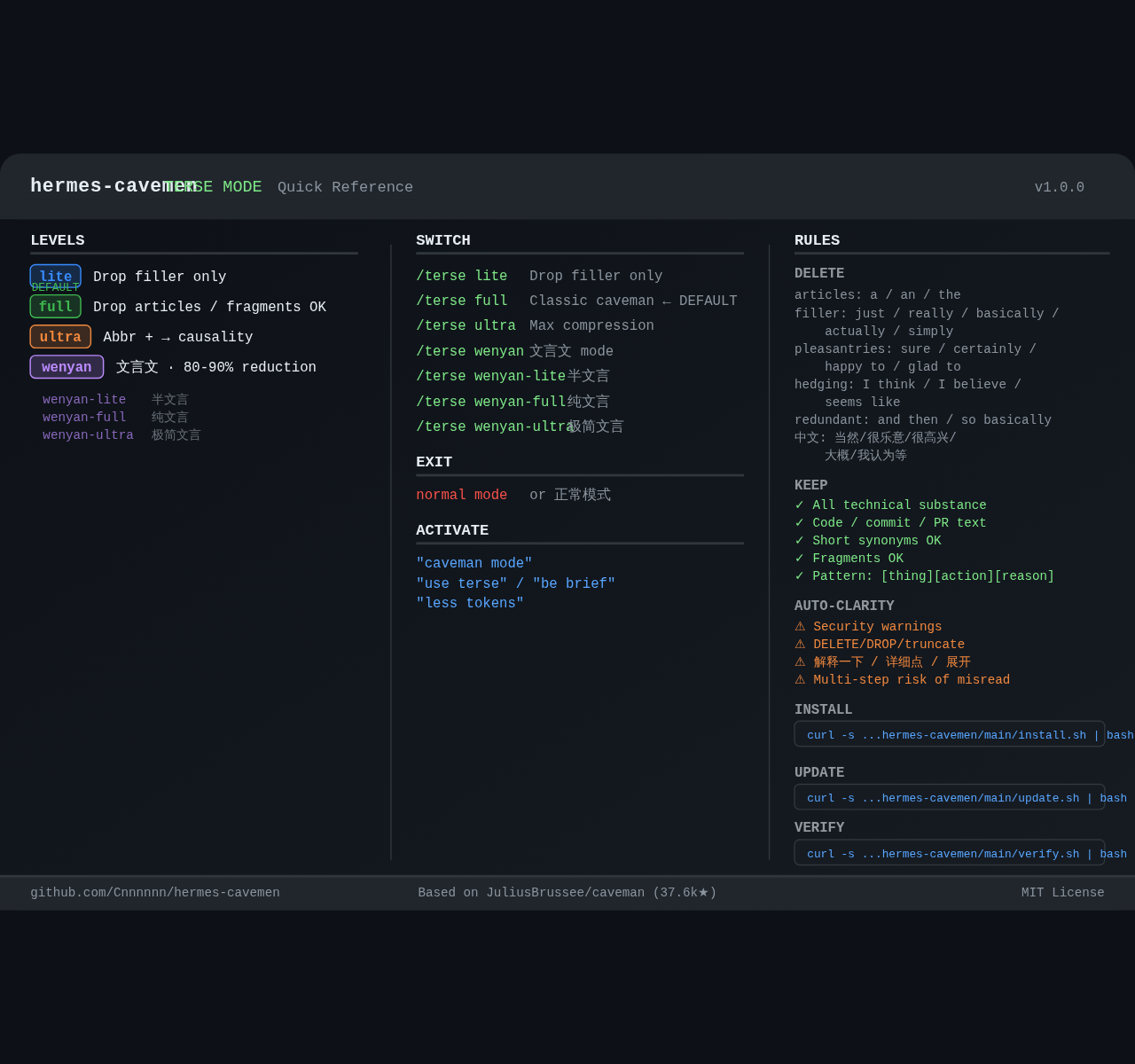
Quick Reference Card
Visual one-page cheatsheet — all levels, commands, rules, and Auto-Clarity in one image:
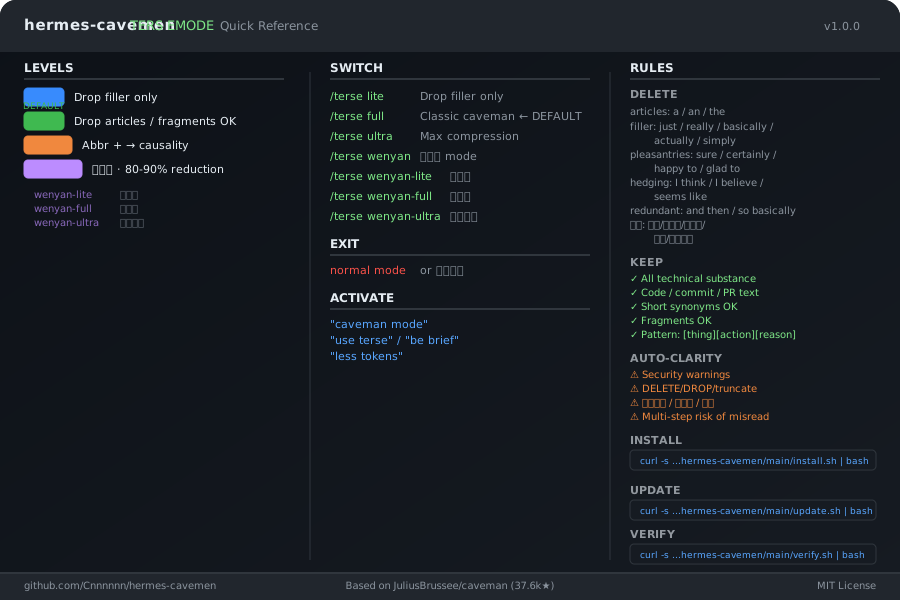
Download: cheatsheet.svg · cheatsheet.png (high-res)
Project Structure
hermes-cavemen/
├── README.md              ← Bilingual intro (this file)
├── SOUL.md                ← Complete Terse Mode rules
├── SKILL.md               ← Skill format (optional)
├── install.sh             ← One-line installer
├── update.sh              ← Self-Update script
├── uninstall.sh           ← Uninstall script
├── verify.sh              ← Installation verifier + compression tester
├── TROUBLESHOOTING.md     ← Common issues + fixes
├── cheatsheet.svg/png     ← Visual quick reference
├── CHANGELOG.md           ← Version history
├── VERSION                ← Current version
├── .github/
│   └── ISSUE_TEMPLATES/   ← Bug / Feature / Verified templates
└── LICENSE                ← MIT
Credit: Based on JuliusBrussee/caveman (37.6k stars, MIT License).
中文
⚡ 快速安装
一行安装:
curl -s https://raw.githubusercontent.com/Cnnnnnn/hermes-cavemen/main/install.sh | bash
搞定。Terse Mode(full 级别)自动激活,无需重启。
验证安装:
/sklls_list | grep terse
输出中有 terse — hermes-cavemen 即为成功。
切换级别:
/terse ultra           # 极致压缩
/terse wenyan          # 文言文
/terse wenyan-lite     # 半文言
/normal mode           # 退出
是什么
hermes-cavemen 是 JuliusBrussee/caveman 的下一代升级版 — 为 Hermes Agent 进阶用户打造,不止步于简单的文本压缩。
原版 caveman:1 个压缩级别,逐词替换。 hermes-cavemen v1.2:12 大智能机制:
| 原版 caveman | hermes-cavemen v1.2 | |
|---|---|---|
| 压缩级别 | 1(full) | 4(lite / full / ultra / wenyan) |
| 语言支持 | 仅英文 | 双语(EN/ZH,自动识别) |
| 自适应压缩 | ✗ | ✓ 任务类型 + 长度 + 语言 |
| 语义密度感知 | ✗ | ✓ 高密度内容减少压缩 |
| 对话级记忆 | ✗ | ✓ 记录已解释话题,压缩重复引用 |
| 矛盾追踪 | ✗ | ✓ 检测自我矛盾,自动降级 |
| 偏好学习 | ✗ | ✓ 静默适应你的 /terse 使用习惯 |
| 文言文语法 | ✗ | ✓ 结构转换(之/乃/為) |
| 质量评分 | ✗ | ✓ verify.sh 衡量事实/方向/动作保留 |
| token 减少 | ~40-60% | ~75%(保留全部准确性) |
为什么选这个? 让你的 AI 更懂上下文。金融文本会留足呼吸空间。它记得你问过什么,能发现自己前后矛盾,还会随着使用越来越懂你喜欢的压缩程度。
Terse Mode 每个新 session 自动激活。
v1.2.1(SOUL 体积优化):
- 14.4KB → 8.4KB(节省 42%) — 12 大机制全部保留,竞争信号更强
v1.2 新功能:
- 对话级记忆 — 记录已解释的话题,后续引用更激进压缩
- 语义密度检测 — 高密度内容(财务/技术术语)获得更少压缩
- 断言追踪器 — 检测长对话中的自我矛盾,降级至 full 并提示
- 用户偏好学习 — 用户频繁手动升降级时静默调整默认级别
- 文言文结构规则 — 基于语法结构转换,非简单词汇替换
- 压缩质量评分 — verify.sh 现在衡量事实/方向/动作保留,不只是比率
v1.1 已有:自适应压缩、多语言感知、自动升级(Auto-Escalation)
安装方式
方式 A — 合并到现有 SOUL.md(推荐)
复制 SOUL.md 中的 ## Terse Mode 部分,追加到现有 SOUL.md 文件末尾。原有内容保持不变。
方式 B — 完全替换
直接用本仓库的 SOUL.md 整体替换。
⚠️ 会覆盖原有所有内容,请先备份。
效果对比
| 普通输出(87 tokens) | Terse — full(24 tokens) |
|---|---|
| “当然!我很高兴帮你解决这个问题。你遇到的问题很可能是由于认证中间件没有正确验证 token 过期时间导致的。让我看一下并建议一个修复方案。” | “认证中间件 bug。Token 过期检查用了 < 而不是 <=。修:” |
同样答案。减少 75% 字数。脑子还是那个脑子。
级别
| 级别 | 风格 | 示例 |
|---|---|---|
lite |
仅删除 filler/hedging,保留冠词和完整句子。 | “Your component re-renders because you create a new object reference each render. Wrap in useMemo.” |
full |
经典 caveman 风格,允许碎片化句子。← 默认 | “New object ref each render. Inline object prop = new ref = re-render. useMemo.” |
ultra |
极致压缩。缩写 + → 表示因果。 |
“Inline obj prop → new ref → re-render. useMemo.” |
wenyan |
文言文风格。 | “物出新參照,致重繪。useMemo Wrap之。” |
wenyan-lite |
半文言。 | “組件頻重繪,以每繪新生對象參照故。以 useMemo 包之。” |
wenyan-full |
纯文言。 | “物出新參照,致重繪。useMemo ·Wrap之。” |
wenyan-ultra |
极简文言。 | “新參照→重繪。useMemo Wrap。” |
切换: /terse lite|full|ultra|wenyan|wenyan-lite|wenyan-full|wenyan-ultra
退出: 正常模式 / normal mode
自适应压缩
AI 根据上下文自动选择最合适的级别,无需手动切换。
判断信号:
| 信号 | 效果 |
|---|---|
| 任务 = 写代码 | → ultra |
| 输出长(>500字)+ 英文 | → ultra |
| 输出短(<100字) | → lite |
| 用户语言 = 中文 + 指定 wenyan | → wenyan / wenyan-lite / wenyan-full |
| 破坏性操作 | → Auto-Clarity(暂停 terse) |
自动升级(Auto-Escalation): 单次输出超过 800 字且当前为 full/lite 时,在下一段自动切 ultra。只升不降。
用户显式 /terse xxx 永远优先于自适应逻辑。
多语言感知
中英混合输出智能处理:
| 场景 | 行为 |
|---|---|
| 中文主体,英文术语 | 英文术语保持原样,中文段落按 full/ultra 压缩 |
| 用户要求”用英文解释” | 整段按英文 full/ultra 规则处理 |
| 中英文段落交替 | 各段独立判断压缩 |
| 纯英文输出 | 按英文规则压缩(删冠词、短同义词) |
对话级记忆
会话期间追踪「已覆盖话题」,后续引用更激进压缩:
- 已陈述的关键事实:下次提及 → 用标签/代词,不重复解释
- 已解释的话题:用户再次问起 → ultra 压缩(用户已知概念)
- 已表达的偏好:立即遵从(若偏好暗示更多细节则升 level)
- 新信息引入:加入会话上下文,供后续消息简洁引用
此记忆为会话级——每次新会话重置。持久偏好写入 MEMORY.md。
语义密度检测
压缩强度根据信息密度调整,而非仅根据长度:
| 密度 | 信号词 | 规则 |
|---|---|---|
| 高 | PE/MACD/ROE/营收/北向资金/百分比 | 少压一级 |
| 低 | 当然/可能/大概/我认为 | 多压一级 |
| 中 | 混合 | 标准级别 |
防止「干货被压、废话存活」——高价值内容得到保留。
断言追踪器
维护本次对话中已做关键断言的运行集合:
- 持仓信息:成本价、股数、公司名
- 财务比率:PE、PB、ROE、增长率
- 方向性判断:上涨/下跌/买入/卖出
若新输出与已有断言矛盾:本次回复降级至 full,附加说明:(断言冲突检测 — 以下澄清)
会话级,随会话重置。
用户偏好学习
根据用户手动干预历史调整默认级别:
terse_upgrades:用户手动升级/terse的次数terse_degrades:用户手动降级或说「太简略了」的次数- 记录在 MEMORY.md,跨会话持久
规则:
- 最近 30 天内,upgrades − downgrades ≥ 3 → 默认级别静默升一级
- 最近 30 天内,downgrades − upgrades ≥ 3 → 默认级别静默降一级
显式 /terse xxx 永远优先。调整对用户不可见。
文言文结构规则
文言文压缩使用古典汉语语法转换,而非简单词汇替换:
| 规则 | 示例 |
|---|---|
| 语序倒装 | 「X 的 Y」→「Y 之 X」 |
| 主语省略 | 「我看到X,我分析Y」→「见X析Y」 |
| 语气词去除 | 了/矣/焉/哉 → (去除) |
| 动词优先 | 「check the price」→「查价格」 |
| 经典对仗 | 买·卖 / 盈·亏 |
| 名词动用 | 「策略」→「以策」 |
英文技术术语保持原样(不翻译)。sed s/the/ /g 不是文言文——会产生乱码英文。
自动退出情况
以下情况 Terse Mode 自动暂停,恢复正常输出:
- 安全警告 / 不可逆操作确认
- 破坏性操作(DELETE / DROP / truncate)
- 用户要求详细解释:
解释一下/详细点/展开 - 多步骤指令可能产生误解时
明确部分完成后自动恢复。
代码边界
代码、commit 消息、PR 描述、技术术语均正常书写,不受 terse 影响。\`` 代码块内的注释也保持原样。Terse 只作用于自然语言输出文字。
级别持久化
每次执行 /terse xxx 时,偏好会写入 MEMORY.md。新会话启动时自动读取并应用,无需重复设置。
压缩质量评分
运行 verify 脚本测量压缩效果与质量:
# 内置基准测试
curl -s https://raw.githubusercontent.com/Cnnnnnn/hermes-cavemen/main/verify.sh | bash

# 测试自定义文字
curl -s https://raw.githubusercontent.com/Cnnnnnn/hermes-cavemen/main/verify.sh | bash -s -- "你的测试文字"

# 质量加权评分
curl -s https://raw.githubusercontent.com/Cnnnnnn/hermes-cavemen/main/verify.sh | bash -s -- --quality "测试文字"
通过标准:lite ≥20%、full ≥40%、ultra ≥60%、wenyan ≥70%
质量维度:事实保留(数字)、方向保留(涨/跌/买/卖)、动作保留(修/查/fix)
实现机制:原版 vs hermes-cavemen
| 维度 | 原版 caveman | hermes-cavemen |
|---|---|---|
| 目标平台 | Claude Code | Hermes / OpenClaw |
| 激活机制 | Hook 系统 + flag 文件 | SOUL.md 规则注入 |
| 持久化 | ~/.claude/.caveman-active |
MEMORY.md |
| 多平台同步 | CI 自动同步到 8+ 平台 | 单平台,无需同步 |
| 状态栏显示 | Claude Code UI 中的 [CAVEMAN] |
不支持 |
| Wenyan 子级别 | lite / full / ultra | lite / full / ultra + wenyan-lite/full/ultra |
| 自适应压缩 | 无 | 有(任务/语言/长度信号) |
| 多语言感知 | 无 | 有(主语言优先规则) |
差异原因: Hermes / OpenClaw 不提供 Claude Code 的 Hook API、flag 文件机制、状态栏和插件系统。hermes-cavemen 通过 SOUL.md 规则注入实现等效行为——Hermes 每次启动读取 SOUL.md,规则自动生效。
完全一致的部分: 核心压缩规则、强度级别、Auto-Clarity 条件、代码/commit/PR 边界、激活/退出指令、约 75% 的 token 压缩率。
维护脚本
三个支撑长期使用的脚本:
# Self-Update — 检查新版本、显示更新日志、一键升级
curl -s https://raw.githubusercontent.com/Cnnnnnn/hermes-cavemen/main/update.sh | bash

# Verify — 测试 Terse Mode 是否生效,测量压缩率
curl -s https://raw.githubusercontent.com/Cnnnnnn/hermes-cavemen/main/verify.sh | bash

# Uninstall — 移除 Terse Mode 规则,恢复备份
curl -s https://raw.githubusercontent.com/Cnnnnnn/hermes-cavemen/main/uninstall.sh | bash
遇问题见 TROUBLESHOOTING.md。
速查卡
可视化单页参考——所有级别、命令、规则、Auto-Clarity 一图掌握:
下载:cheatsheet.svg · cheatsheet.png(高清版)
项目结构
hermes-cavemen/
├── README.md              ← 双语介绍(本文件)
├── SOUL.md                ← 完整 Terse Mode 规则
├── SKILL.md               ← Skill 格式(可选)
├── install.sh             ← 一键安装脚本
├── update.sh              ← 自我更新脚本
├── uninstall.sh           ← 卸载脚本
├── verify.sh              ← 安装验证 + 压缩率测试
├── TROUBLESHOOTING.md     ← 常见问题与解决方案
├── cheatsheet.svg/png     ← 可视化速查卡
├── CHANGELOG.md           ← 版本历史
├── VERSION                ← 当前版本
├── .github/
│   └── ISSUE_TEMPLATES/   ← Bug / Feature / Verified 模板
└── LICENSE                ← MIT
致谢:基于 JuliusBrussee/caveman(37.6k stars,MIT License)。